There are nearly 30,000 trucking related locations and 270,000 truck parking spots on the Trucker Path app. It may seem like a lot but new locations for truckers are built and smaller, lesser-known locations like family-run truck stops may slip through the cracks. No matter the size of the location it has a place in our database for truck drivers to access reliable information about.
If for some reason a location does not appear on Trucker Path there’s a simple way to add a place!
Steps:
1. Open the Trucker Path app
2. Click the menu tab at the top left of the map screen
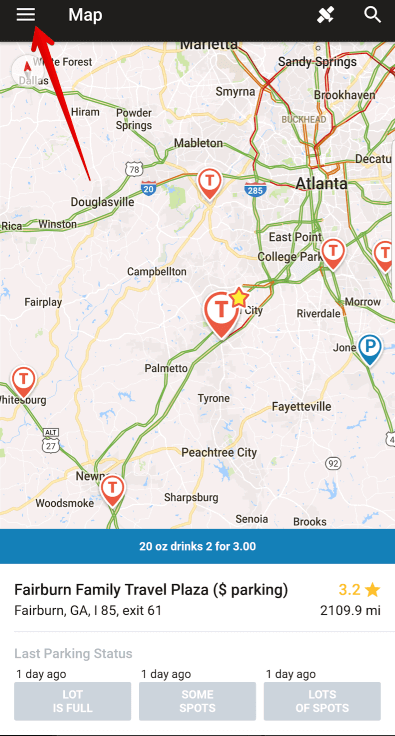
3. Click Add Places on the lower left side
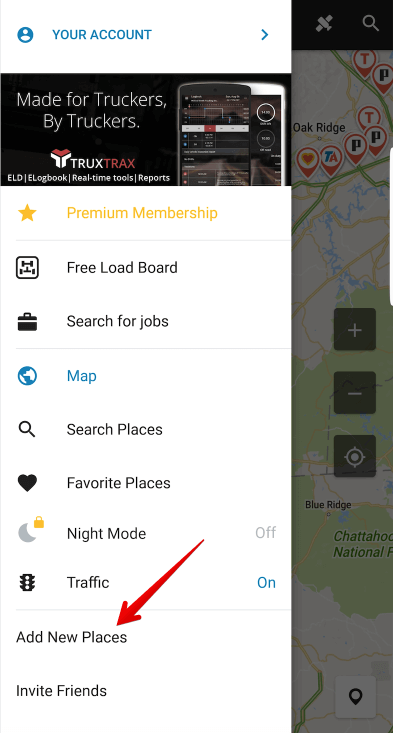
4. Choose the email provider you wish to use to send a message
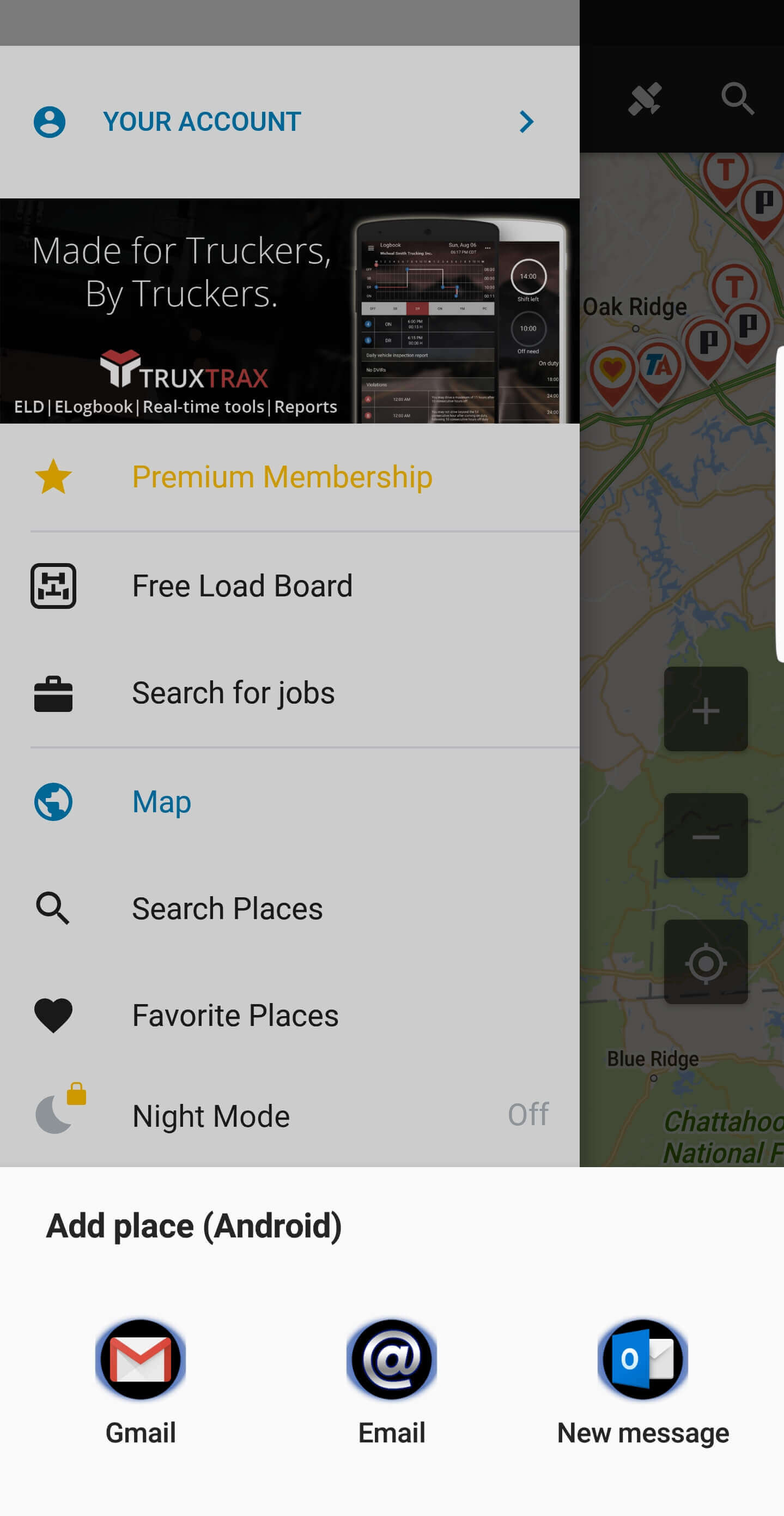
5. Fill out the Name, Location and Details about the new place and send the message

Your message will be sent directly to our support team who will be happy to help facilitate the addition of the new place. (Updates to locations typically take 24-48 hours to appear on the app)
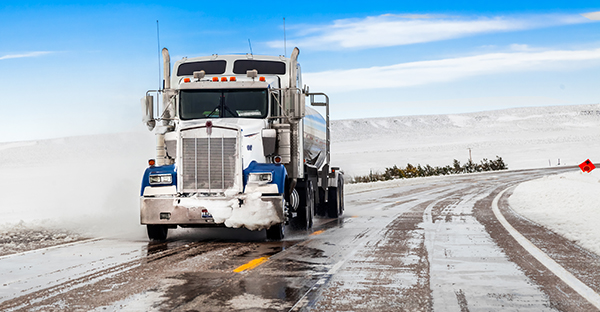



ELD Mandate Exemptions [p]Get clarification on electronic logging devices and ELD mandate exemptions set to take effect in December 2017. [/p]
[h2]ELD Mandate Exemptions[/h2]
[p]As of December 18, 2017, most drivers that currently use paper logs will have to switch over to an electronic logging device. The choices will be an automatic onboard recording device (AOBRD) meeting the current requirements in §395.15, installed before December 18, 2017, or a device meeting the electronic logging device (ELD) standards found in Subpart B to Part 395 and the associated appendix.[/p]
[p]There are <strong>five ELD Mandate exemptions</strong> including:[/p]
[ul]
[li]Drivers that only had to fill out a log eight or fewer days out of the last 30 days. This would include “short-haul” drivers that normally operate under the 100 and 150 air-mile exceptions and intermittent drivers.[/li]
[li]Drivers operating a vehicle older than the model year 2000. This also applies to the model year 2000 and newer vehicles that do not have the original engine in them, if the engine serial number indicates that the engine is older than the model year 2000. [/li]
[li]Drivers operating a vehicle that is part of a driveaway/towaway shipment. [/li]
[li]Drivers driving or towing a recreational vehicle that is part of a driveaway/towaway shipment.[/li]
[li]Drivers who are driving a truck that was rented for eight days or less. [/li]
[/ul]
[p]How are officers on the road going to verify that a driver claiming one of the exemptions is actually entitled to it? It is easier than you might think. [/p]
[h2]ELD Exemptions and Short-Haul Drivers[/h2]
[p]During a roadside inspection, the officer can contact the carrier for the time records related to a driver he/she is inspecting. The officer can then verify that the driver is complying with the terms of the 100 or 150 air-mile exemptions. This simply involves the officer verifying that there were time records and they showed the driver staying under the limits attached to the exemption. [/p]
[p]If the records show the driver as operating under the 100 or 150 air-mile exception often enough, there would be no violation for the driver not using an ELD.[/p]
[p]As far as intermittent drivers, the officer will inquire as to how many days the driver has worked out of the last 30. If it ends up to be 8 or fewer out of any 30-day period, there is no violation.[/p]
[h2]ELD Exemptions on Older Vehicles[/h2]
[p]To verify that the driver can use paper logs due to the age of the vehicle, the officer will simply check the vehicle identification number (VIN). If the VIN indicates that the vehicle is the model year 1999 or older vehicle, there will be no violation for the driver using a paper log rather than an electronic log.[/p]
[p]How is this determined? [/p]
[p]The model year is coded in the vehicle’s VIN at the 10th position. Presently, 2000 and newer vehicles have Y, 1 to 9, or A to H in the 10th position (i, o, u, and z are not used in VINs by the way). If the 10th digit is anything other than those listed, the vehicle is manufactured before 2000.[/p]
[p]In the case of the model year, 2000 or newer vehicle that has been retrofitted with the model year 1999 or older engine, to determine if the engine is manufactured before the year 2000, the officer will ask to see the engine serial number. Using the serial number and available software, the officer can quickly validate the engine model year.[/p]
[h2]Driveaway/Towaway ELD Exemptions[/h2]
[p]To verify that the driver is allowed to use the driveaway/towaway exception to use a paper log rather than an electronic log after December 18, 2017, all the officer or auditor needs to do is ask for the shipment paperwork. The shipment paperwork will then be used to verify that the vehicle the driver is operating is part of the shipment. If so, then there would be no violation for the driver using a paper log rather than an electronic logging device.[/p]
[h2]Rented Trucks[/h2]
[p]To verify that a driver is allowed to use the rented truck exemption, the driver must be able to present the rental agreement showing that the vehicle is being rented for 8 days or less. The driver must use paper logs and have records for the previous seven days. Printouts from an ELD system are acceptable. The exemption does not cover “leased” vehicles or vehicles rented for more than 8 days. Multiple back-to-back rental agreements will result in the carrier being cited for not using ELDs.[/p]
[h2]Still Confused about ELD Mandate Exemptions?[/h2]
[p]If you’re still confused about Exemptions to the mandate or wondering if you need to comply with the ELD mandate, contact J.J. Keller for a free ELD Exemption Assessment. Their ELD specialist will guide you through 21 questions created by their hours of service subject matter experts to help you determine if you are exempt from using ELDs. Call the ELD Exemption hotline at 888-531-8899 or <strong>request an assessment <a href="https://www.jjkeller.com/webapp/wcs/stores/servlet/infoform_10151_-1_10551_52145?cm_mmc=Misc-_-ELDExemptionAssessment-_-eldexempt-_-null">here</strong></a>.[/p]
[p]<strong>J. J. Keller & Associates, Inc.</strong>[/p]
[p]Since its beginning as a one-man consulting firm in 1953, J. J. Keller & Associates, Inc. has grown to become the most respected name in safety and regulatory compliance. Now over 1,400 associates strong, J. J. Keller serves over 600,000 customers — including over 90% of the Fortune 1000® companies. The company’s subject-matter expertise spans nearly 1,500 topics, and its diverse solutions include ELogs and mobile technology; training via online courses, streaming video or DVD; online management tools; managed services; consulting services; online and print publications; forms and supplies.[/p]
<strong>[p]About the Author:[/p]</strong>
[p]Tom Bray has been with J. J. Keller & Associates, Inc. for 11 years. However, as he does not get enough excitement working at J. J. Keller and chasing after six kids and nine grandkids, he also chooses to work nights and weekends as a firefighter/EMT.[/p]
How to Start a Hotshot Trucking Business
[p]Ever wondered how to be your own boss while enjoying beautiful sceneries across America?
The freight industry is the backbone of America’s economy contributing more than <a href="https://tradingeconomics.com/united-states/gdp-from-transport">500 billion USD</a> every quarter and the numbers are increasing each year. It’s a lucrative industry which gives handsome rewards. However, it is not easy getting into traditional trucking due to the requirements needed.[/p]
[p]What if there was a way to be a part of the trucking industry without dealing with all the hassle? The good news is there is a sure-fire way of being a part of the trucking industry and you can get started in a few days. What is it, you ask? The answer to that question is “Hotshot Trucking”. But there are still a few requirements before you are eligible to haul freight. Fortunately, these requirements are easy to complete and we will explain everything step by step below.
[/p]
<h2></h2>
[p][b]What is Hotshot trucking? [/b][/p]
[p]Hotshot truck drivers are freelancers who work privately carrying freight from one point to the other without any employer restrictions or scheduling restrictions. In other words, you are your boss and you can choose when to earn and how much to earn. All you need is a medium or heavy-duty truck with at least 7,000 pounds of hauling force and a trailer. A Dodge Ram 3500, a Toyota Tacoma, or any version of the Ford F-series truck can work well. [/p]
[p]Currently, around 70% of the goods you can find on the shelves are transported by hotshot truckers and independent freight transporters. According to estimates, the trucking industry is expected to grow by 2.3% yearly till 2024. With freight volumes increasing day by day it is the perfect time to set up your own hotshot trucking business.
[/p]
[p][b]Pros and cons of Hotshot Trucking?[/b][/p]
[p]Hotshot Trucking comes with a lot of advantages especially if you want to kick-off your trucking business easily. But be wary also of some limitations and trade-offs when entering this kind of trucking business.
[/p]
[img src="https://truckerpath.com/uploads/2020/10/How-to-Start-a-Hotshot-Trucking-Business-pros_and_cons_table.png" alt=""]
[p][b]How to Begin?[/b][/p]
[p]Now that you have a basic idea of hotshot trucking let’s get started on the specifics: [/p]
<h2></h2>
[p][b]Set up an LLC[/b][/p]
[p]You need to set up a Limited Liability Company (LLC) and register it with your state. This is the first step in registering your business and it doesn't matter if you are working alone or if you intend to invite others to join in with you, setting up a legal company gives you many <a href="https://www.legalzoom.com/articles/advantages-of-an-llc">benefits</a> such as:[/p]
<ul>
<li>Limited personal liability</li>
<li>Less paperwork</li>
<li>Tax advantages</li>
<li>Ownership and Management flexibility</li>
<li>Flexible profit distribution</li>
</ul>
[p][b]Register With the Tax Authorities [/b][/p]
[p]Once you have your LLC set up, the next step is to get a <a href="https://www.irs.gov/individuals/international-taxpayers/taxpayer-identification-numbers-tin">Tax ID</a> to go with your business. The tax ID or the Employer Identification Number (EIN) will allow you to receive checks and other forms of payments directly to your business account. That takes us to our next step. [/p]
<h2></h2>
[img src="https://truckerpath.com/uploads/2020/10/How-to-Start-a-Hotshot-Trucking-Business-make_a_business_bank_account.jpg" alt=""]
[p][b]Make a Business Bank Account[/b][/p]
[p]A separate bank account will allow you to divert all your business-related transactions to your business bank account. This allows you to keep track of your expenditures while also giving you the liberty to make and receive payments.[/p]
[p][b]Apply for a CDL (optional)[/b][/p]
[p]Hotshot trucking does not require a commercial driver’s license (CDL) since in most cases you won’t be exceeding the gross weight limit determined by the authorities. [/p]
[p]You don’t need a CDL if: [/p]
<ul>
<li>If the total weight you are pulling is less than 10,000 pounds.</li>
<li>If the combined weight of the vehicle and trailer is less than 26,000 pounds. </li>
</ul>
[p]Getting a CDL is no easy task. You have to enlist in a reputable training academy, go through several weeks of training, and then apply as well as pass the CDL exam. Therefore, it is better to forego this requirement in the early stages of your business but its best to acquire the license once your business is up and running.
[/p]
<h2></h2>
[img src="https://truckerpath.com/uploads/2020/10/How-to-Start-a-Hotshot-Trucking-Business-acquire_relevant_equipment-1.jpg" alt=""]
[p][b]Acquire Relevant Equipment [/b][/p]
[p]As you know, hotshot trucking involves a lot of hauling and towing. It is important to have a sturdy and reliable truck if you want to save yourself a lot of grief later. You will need a good medium to heavy-duty truck with a lot of power (around 400HP) to pull at least a ton and a 30 ft. gooseneck flatbed trailer to begin. A decent truck can cost from $15,000 to $60,000. A good trailer costs from $7,000 to $25,000. It is up to you to decide how much you want to invest in the business initially. If you already have a truck at home and you don’t intend to get a CDL right away then you can save money by buying a cheap trailer and starting your business with minimum investment. [/p]
<h2></h2>
[p][b]Further Government Approvals [/b][/p]
[p]It is a good idea to register your business with the Department of Transport (DOT) in your state and also with the federal authority if you intend to drive interstate. The state will provide you a DOT number and the federal government authority will give you a Motor Carrier (MC) number. These numbers must be emblazoned on the side of your vehicle. [/p]
<h2></h2>
[img src="https://truckerpath.com/uploads/2020/10/How-to-Start-a-Hotshot-Trucking-Business-getting_your_first_order.jpg" alt=""]
[p][b]Getting Your First Order [/b][/p]
[p]It’s often difficult to get your first order but there are resources available online that can help you out. You can sign-up and keep an eye out for potential contracts using <a href="https://truckerpath.com/truckloads/free-load-board/">loadboards</a>, which is an online marketplace where truck owner-operators, shippers, and freight brokers can post and search for loads. If a contract fits your requirements you can sign-up with them and begin your hotshot trucking journey. [/p]
<h2></h2>
[p][b]Conclusion [/b][/p]
[p]It is not easy to start a business from scratch and accept profits from the get-go. However, if you work hard, complete all the requirements and stay motivated, you can slice through the initial difficulties and begin expanding and earning handsomely all while being your own boss. [/p]
<h2></h2>
<h2></h2>
[p][b]By Aldous Aldwin[/b][/p]
Types of Truck Freight [h2] Types of Truck Freight [/h2]
[p] There are many types of truck freight, each with a unique yet important role for moving different truck freight across the nation and load boards make it easy to find truck freight.
[/p]
[h2] Truck Freight [/h2]
[p]Truck freight is responsible for <a href="https://truckerpath.com/blog/trucking-industry-trends/">70 percent of all cargo that is transported in America</a>. That's over 10 billion tons each year![/p]
[p]Companies ship a variety of truck freight ranging in size, value, and contents. Ever wonder how ice cream somehow stays frozen when shipped across America or how huge machines make their way from a factory in Kentucky to a warehouse in California? It's all thanks to truck freight and the specific trailers and equipment necessary for the dedicated men and women of the trucking industry to haul the freight.
[/p]
[h2] Find Truck Freight on Truckloads Load Board[/h2]
[p]If you have <a href="https://truckerpath.com/blog/trucking-authority/">trucking authority</a> and are looking for truck freight loads you can use Truckloads free load board to customize your truck freight search and filter results that are the best fit for you. You can choose from 11 different trailer equipment types when searching for loads and search based on location, date, deadhead and even load weight. [/p]
[p]Use Truckloads web version or download the app and view over three million loads per month including unlimited access to premium loads as well as the ability to call a broker right from the app from anywhere. Stay loaded and know where nearby truck freight loads are with Trucker Path Truckloads![/p]
[button text="Try Truckloads for Free" href="https://truckerpath.com/truckloads/free-load-board/?utm_source=Blog&utm_medium=truckfreight&utm_campaign=Aug10" width="250px"]
[video id=snyBYpnuhWw]
[h2] Flatbed Trucks [/h2]
[p]Flatbed trucks are truck freight with a trailer that is leveled off and open with no sides or top, hence the name flatbed. This design makes it easier to load and unload large freight that otherwise couldn't fit into a standard 53-foot trailer. Truck freight is secured on flatbeds with straps, tarps and other locking devices to keep the load tied down. [/p]
[p]
Generally, flatbed trucks are used as truck freight for construction goods, large manufactured parts, and various oversized loads. An oversized load is any truck freight that is over 8.5 feet wide. This type of truck freight requires red flags and lights to help identify the oversized truck freight on the road.
[/p]
[img src="/uploads/2017/08/Flat-Bed-Final.png" alt="flatbed truck freight"]
[h2] Step Deck Trucks[/h2]
[p] Similar to flatbed trucks, step deck trucks also have a level surface that is open. The main difference between truck freight with a flatbed and step deck truck is that the step deck truck will have a lower position set closer to the ground. This helps truck freight that is taller sit lower to avoid potential hazards such as bridge clearances. [/p]
[img src="/uploads/2017/08/Step-Deck-Final.png" alt="step deck truck freight"]
[h2] Reefer Trucks [/h2]
[p]Also known as refrigerated trucks, reefer trucks are truck freight with a trailer that is temperature controlled in order to haul goods that must remain within a certain temperature zone at all times such as food. While reefer trucks commonly haul loads that include perishable foods, they also transport things like pharmaceuticals, chemicals, and other <a href="https://truckerpath.com/blog/hazmat-transportation/">hazmat materials</a>, though not at the same time of course. [/p]
[img src="/uploads/2017/08/Reefer-Final.png" alt="reefer truck freight"]
[h2] Dry Vans [/h2]
[p]Dry vans are the most common truck freight. They are typically a standard 53-foot trailer like the ones you see connected on the back of a semi-truck on the interstate that might say Walmart, Target or Schneider. Although not an actual van, they are the most common truck freight to haul goods, providing a trailer that is sealed and protected from the elements. [/p]
[p]
Look around your home and chances are the things you see were hauled by dry van truck freight. Dry van loads are used by a variety of companies looking to ship anything from consumer products, home goods, electronics, and a variety of other products that don't require refrigeration.
[/p]
[p]
Choosing to haul truck freight with a dry van can result in an increased opportunity in available freight to haul due to the volume of truck freight shippers have for dry vans. [/p]
[img src="/uploads/2017/08/Van-Final.png" alt="Dry Van freight"]
[h2] Other Types of Truck Freight [/h2]
[ul] There are several other truck freight loads you'll find as well, including:
[p]
[li]Auto Carrier - trailer that hauls automobiles and other vehicles[/li]
[img src="/uploads/2017/08/Auto-Trailer-Final.png" alt="auto carrier freight"]
[li] Dump Trailer - trailer with a lift to incline and allow for loads to be dumped [/li]
[img src="/uploads/2017/08/dump-trailer-Final.png" alt="dump trailer freight"]
[li] Tanker - trailer that is a long cylinder shape hauling liquids like fuel[/li]
[img src="/uploads/2017/08/Tanker-Final.png" alt="tanker truck freight"]
[/ul]