Hello Trucker Path users,
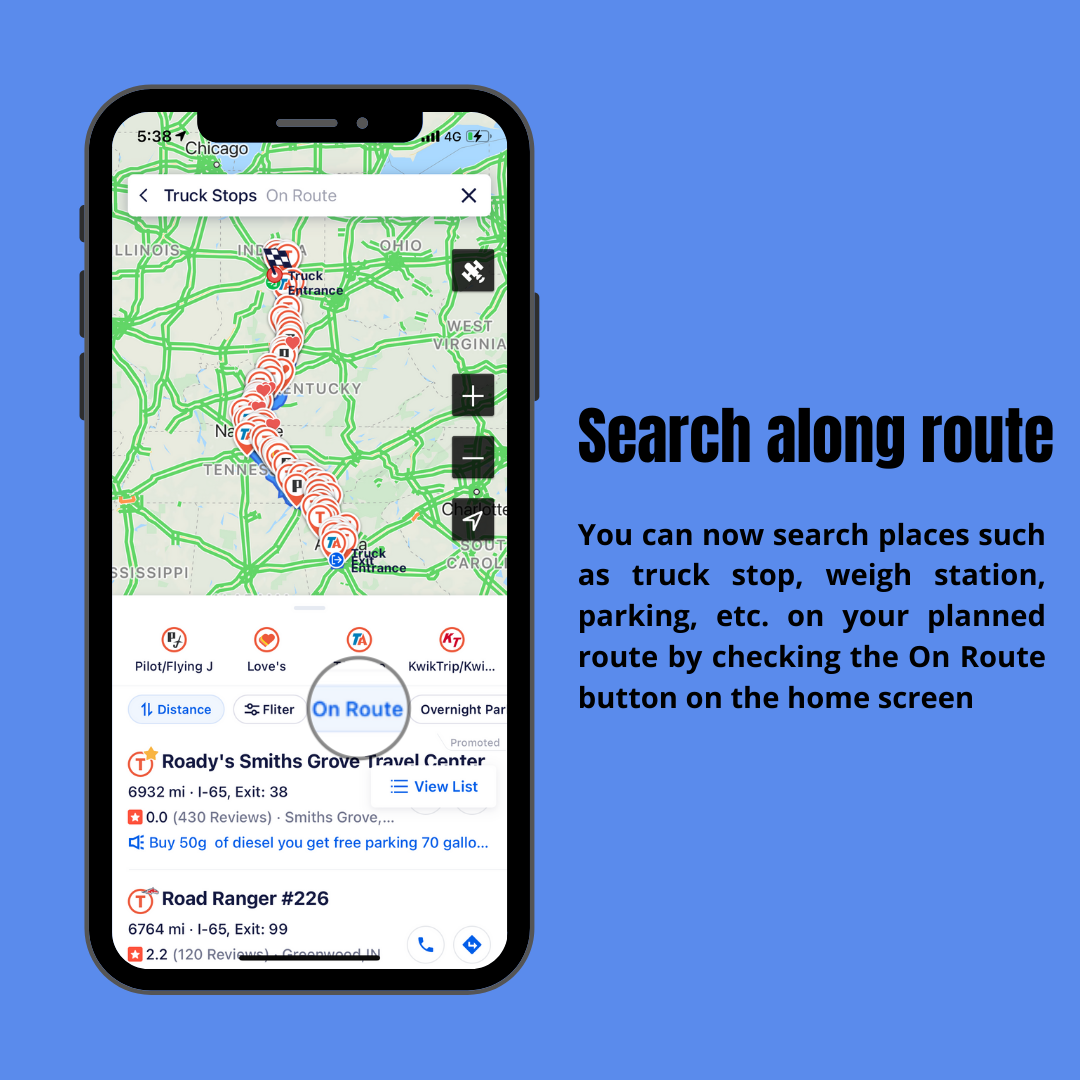
We’re excited to tell you another improvement we made to our search function on the Trucker Path app.Starting from version 4.4.2, you can search places such as truck stops, weigh stations, parking, etc. on your planned route by checking the On Route button on the home screen.
We’ll continue to enhance your experience using our search and trip planning function, and we’d love to hear your thoughts on this feature.
Stay tuned for further updates!




Access our Help Center on the Go!
<strong>It’s important that our users are able to make the most out of Trucker Path, and we are here to help! </strong>
<br>
<br>
The team at Trucker Path are here remind you that our Help Center is a fast and free way to fix any problems you may have encountered when using the app. Mobile and web accessibility means you’ve got the support you need on the go.
<br>
<br>
The Help Center can be found on:
<br>
<br>
<b>1)</b> Our Website – Find the Help Center under 'Company'.
<br>
<br>
<a href="https://truckerpath.com/uploads/2021/11/Finding-the-Help-Center.jpg"><img src="https://truckerpath.com/uploads/2021/11/Finding-the-Help-Center.jpg" alt="" width="450" height="180" class="aligncenter size-medium wp-image-6258" /></a>
<br>
<a href="https://help.truckerpath.com/hc/en-us" target="_blank">Or click here to visit the Help Center.</a>
<br>
<br>
<b>2)</b> Our App – Under <b>Me</b>, tap <b>User Manual</b>.
<br>
<br>
<a href="https://truckerpath.com/uploads/2021/11/ezgif.com-gif-maker-44.gif"><img src="https://truckerpath.com/uploads/2021/11/ezgif.com-gif-maker-44.gif" alt="" width="200" height="400" class="aligncenter size-medium wp-image-6258" /></a>
<br>
<br>
If your problem is not covered on the Help Center, you can get in touch with <b>Customer Support</b> directly on the Trucker Path app or send us an email at <b>support@truckerpath.com</b>
Trucker Path App: Severe weather warning <div style="text-align: justify">
[p]Hello Trucker Path users,[/p]
[p]We're excited to tell you another improvement we made to our navigation function on the Trucker Path app.[/p]
[p]We've added a severe weather warning with data provided from weather.gov in the trip plan and navigation views. When your planned route goes through areas with severe weather such as high wind, winter storm, flood, etc, the weather icon with a yellow exclamation point will point out the area. You can tap the toggle on the left to see the affected area in red.[/p]
[img src="https://truckerpath.com/uploads/2021/02/202102-FB-TP-PF-Severe_Weather_Warning-1.jpg" alt=""]
[img src="https://truckerpath.com/uploads/2021/02/202102-FB-TP-PF-Severe_Weather_Warning-2.jpg" alt=""]
[p]We'll continue to enhance your experience using our app, and we'd love to hear your thoughts on this feature.[/p]
[p]Stay tuned for further updates![/p]
</div>