Hello Trucker Path users,
We’re excited to tell you another improvement we made to places on the map in the Trucker Path app.
You’ll now able to see the truck entrance of places on the map, home page, search page as well as in navigation. The truck entrance will also be used as guidance to lead your arrival in navigation.
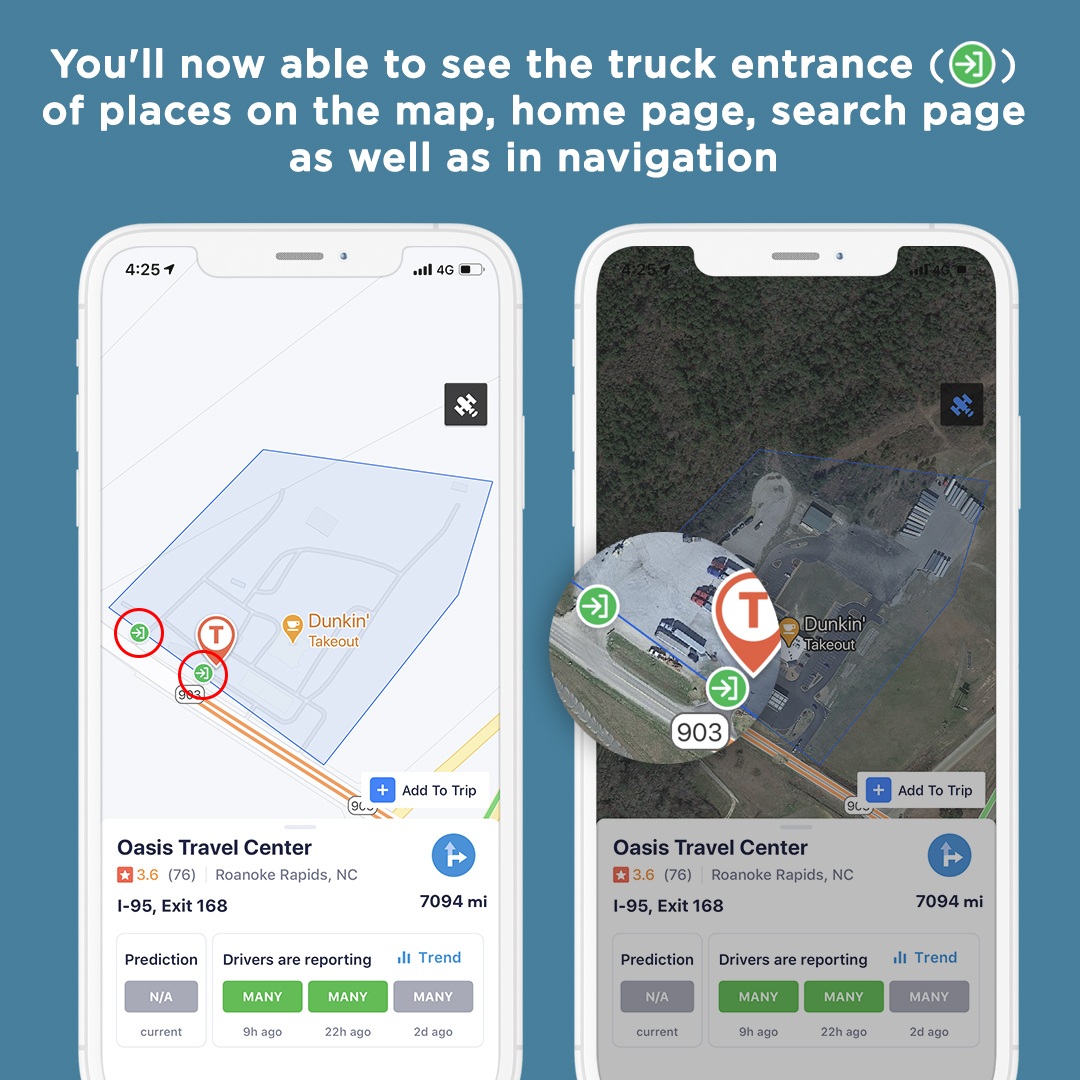
We’ll continue to enhance your experience using places and navigation, and we’d love to hear your thoughts on this feature.
Stay tuned for further updates!
Experience Trucker Path today via this link: https://sixdays.page.link/tLUu




Trucker Path App: Severe weather warning <div style="text-align: justify">
[p]Hello Trucker Path users,[/p]
[p]We're excited to tell you another improvement we made to our navigation function on the Trucker Path app.[/p]
[p]We've added a severe weather warning with data provided from weather.gov in the trip plan and navigation views. When your planned route goes through areas with severe weather such as high wind, winter storm, flood, etc, the weather icon with a yellow exclamation point will point out the area. You can tap the toggle on the left to see the affected area in red.[/p]
[img src="https://truckerpath.com/uploads/2021/02/202102-FB-TP-PF-Severe_Weather_Warning-1.jpg" alt=""]
[img src="https://truckerpath.com/uploads/2021/02/202102-FB-TP-PF-Severe_Weather_Warning-2.jpg" alt=""]
[p]We'll continue to enhance your experience using our app, and we'd love to hear your thoughts on this feature.[/p]
[p]Stay tuned for further updates![/p]
</div>
PSA: Android users can update "Android System WebView" to avoid crashes [p]To all our Trucker Path Android users,[/p]
[p]We've seen feedback coming in with issues on Android Device crashing upon opening apps like Gmail, Chrome, etc., and Trucker Path as well. This is an issue stemming from Google's android webview code, which unfortunately also affects Trucker Path. The good news there is a fix available, please follow these steps to restore functionality to your phone, including Trucker Path[/p]
<div style="display: flex;">
[img src="https://truckerpath.com/uploads/2021/03/Android-apps-crashing-webview-a.png" alt=""]
<div style="width: 4px; flex-shrink: 0;"></div>
[img src="https://truckerpath.com/uploads/2021/03/Android-apps-crashing-webview-b.png" alt=""]
</div>
[p]<strong>1. Launch the Google Play Store and go to My apps & games</strong>[/p]
[p]<strong>2. Open the “Installed” tab and select Android System WebView</strong>[/p]
[p]<strong>3. Tap Update</strong>[/p]
[p]<strong>4. Reboot your device</strong>[/p]
[p]If that does not work for whatever reason, another course of action is going to system Settings > Apps & notifications > See all apps > Android System WebView > tap the three-dot overflow menu in the top-right corner > Uninstall updates > OK. These instructions are for Android 11 on Pixel phones, but it should be a similar process on other OS versions and OEM devices.[/p]
[p]Hope this is helpful, know that you are always the highest priority of our work. We continue to provide you the best truck navigation experience possible.[/p]
Trucker Path App: Share facility via social media <div style="text-align: justify">
[p]Hello Trucker Path users,[/p]
[p]We're excited to tell you another improvement we made to our facility sharing function on the Trucker Path app. Upon viewing a facility's information in the app, you can now share it with other truckers via social media by tapping the share button.[/p]
[img src="https://truckerpath.com/uploads/2021/02/202102-FB-TP-PF-Share_Facility_via_Social_Media.jpg" alt=""]
[p]We'll continue to enhance your experience using our navigation and trip planning function, and we'd love to hear your thoughts on this feature.[/p]
[p]Stay tuned for further updates![/p]
</div>